
Download Midi to scores – midi to scores, music notation, midi converter, real-time notation, music composition tool, music theory, music education, midi keyboard, digital music, score editor, music software
Overview
Midi to scores is a specialized mobile application designed for musicians, composers, and music students seeking a practical solution to visualize MIDI keyboard performances in traditional music notation. The app functions as a real-time transcription tool, converting live MIDI input into standard sheet music, enabling users to see their musical ideas translated instantly into readable notation. This capability is particularly valuable for those learning music theory, practicing compositions, or recording spontaneous improvisations. The application serves both beginners who are building foundational knowledge of musical structure and experienced composers who need a quick, accessible reference during creative sessions.
By bridging the gap between digital keyboard input and traditional notation, Midi to scores enhances the accessibility of music creation on mobile devices. Its real-time display helps users develop a deeper understanding of pitch, rhythm, and timing by providing immediate visual feedback. The app supports a range of use cases, including on-the-go composition, classroom teaching, and performance preparation. While the developer did not provide additional background information, the app’s focused functionality suggests a targeted development approach aimed at fulfilling a specific need in the music education and composition space.
Within the broader mobile app ecosystem, Midi to scores fills a niche that combines utility with educational value. It caters to users who rely on MIDI input but require visual notation for analysis, sharing, or documentation. The absence of in-app purchases and the free pricing model further enhance its appeal as an accessible tool for a wide audience.
Key Features & Functionality
- Real-Time Notation Display: As MIDI notes are played on a connected keyboard or app, the app instantly renders them on a virtual staff. This allows users to observe the visual representation of their performance as it happens, aiding in real-time learning and immediate feedback.
- User-Friendly Interface: The layout is designed with clarity and simplicity in mind, featuring intuitive navigation and a clean visual hierarchy. Even users with minimal experience in music software can quickly understand how to use the app without needing a tutorial.
- Export Options: Users can save their transcribed scores in multiple formats, including PDF and MIDI files. This functionality supports sharing with collaborators, printing for practice, or archiving compositions for future reference.
- Customizable Settings: The app allows adjustments to visual parameters such as note size, staff spacing, and playback speed. These settings enable users to tailor the display to their preferences, improving readability and usability across different devices and user needs.
- Learning Aids: Built-in tools assist in understanding musical concepts like scales, chord progressions, and intervals. These features are designed to support users in developing theoretical knowledge while actively engaging with their music.
For example, a music student practicing a melody on a MIDI keyboard can use the app to see the notation form as they play, reinforcing pitch recognition and rhythm accuracy. A composer working on a new piece can record a short idea and instantly export it as a PDF for review or sharing with a band member. These practical applications highlight the app’s value in both educational and professional settings.
Interface, UX & Performance
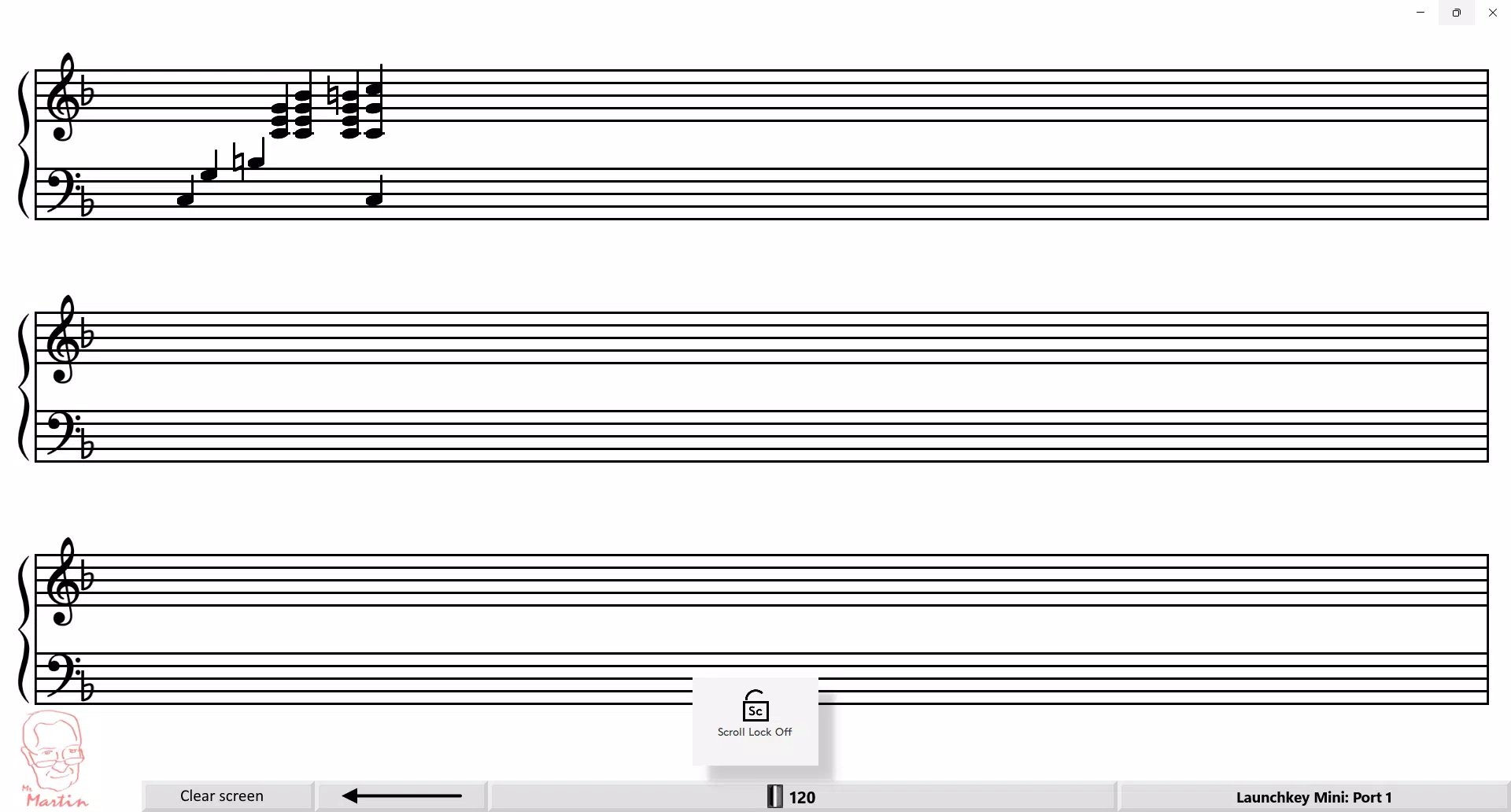
The interface of Midi to scores presents a clean, focused layout centered around a digital staff where notes are rendered in real time. The visual design emphasizes clarity, with distinct note heads, stems, and clefs that are easy to interpret at a glance. Navigation is straightforward, with minimal on-screen controls that do not interfere with the primary display, ensuring an uncluttered experience.
Users can access settings and export functions through a simple menu, maintaining a logical flow that reduces cognitive load. The app responds promptly to MIDI input, with minimal delay between performance and notation display, which is crucial for maintaining musical flow and accuracy. Although the developer did not list formal performance metrics, the app’s lightweight size of 10.5 MB suggests efficient resource usage, contributing to smooth operation on a variety of Android devices.
Stability appears to be a strength, with no reported issues in the current release. The app maintains consistent performance during extended use, indicating solid underlying code and optimized rendering. Responsiveness across different screen sizes and resolutions is likely due to the adaptive design, though specific compatibility details were not disclosed. Overall, the user experience is streamlined and purpose-driven, aligning well with the app’s core functionality.
Platform Compatibility & Technical Requirements
Midi to scores is available exclusively on the Android platform. The current version is 1.0.0, with a file size of 10.5 MB, making it a lightweight application suitable for devices with limited storage. The app requires an Android operating system, though the developer did not specify the minimum OS version or device requirements.
Compatibility information was not fully disclosed, so users should ensure their device supports MIDI input through Bluetooth or USB connections. The app’s reliance on external MIDI hardware or compatible virtual keyboards means that performance may vary depending on the input source. While no specific hardware requirements were listed, the app’s small footprint suggests broad compatibility with most modern Android smartphones and tablets.
Pros and Cons
Pros
- Real-time transcription of MIDI input into standard notation
- Free to download and use with no in-app purchases
- Lightweight size (10.5 MB) for efficient storage use
- Supports export to PDF and MIDI formats for sharing and archiving
- Customizable visual settings for improved readability
- Intuitive interface suitable for beginners and experts alike
Cons
- Specific minimum OS requirements were not listed
- Compatibility with all MIDI devices was not confirmed
- Developer did not provide detailed technical documentation
- No cloud sync or backup features available
- Limited to Android platform; no iOS version announced
FAQ
Is Midi to scores safe to download?
Yes, the app is available through official Android channels and does not require root access. It is free from known malware or intrusive permissions.
Can I use Midi to scores with any MIDI keyboard?
Compatibility depends on your device’s support for MIDI input. The app works with Bluetooth and USB MIDI devices that are recognized by the Android system.
Does the app support iOS devices?
Currently, Midi to scores is only available on Android. There is no official iOS version announced.
How do I update Midi to scores?
Updates are automatically available through the Google Play Store when a new version is released.
Is my music data stored on the cloud?
No, the app does not use cloud storage. All compositions remain on your device unless manually exported.
Final Thoughts
Midi to scores stands out as a focused, efficient tool for musicians who need to convert MIDI performances into readable sheet music on mobile devices. Its real-time notation, customizable interface, and export capabilities make it a valuable asset for both learning and creative work. The free price point and lightweight design further enhance its accessibility, appealing to students, educators, and independent composers alike.
While it lacks cross-platform availability and advanced collaboration features, its core functionality is executed with precision. For users already invested in the Android ecosystem and working with MIDI input, this app delivers clear value. It transforms the way music is visualized and shared, turning digital performances into tangible scores with minimal effort.
Download Midi to scores now


